
Are repetitive, manual tasks consuming hours of your organization’s resources that could be automated easily?
Do your manual processes create delays in decision-making, increase errors, or prevent growth?
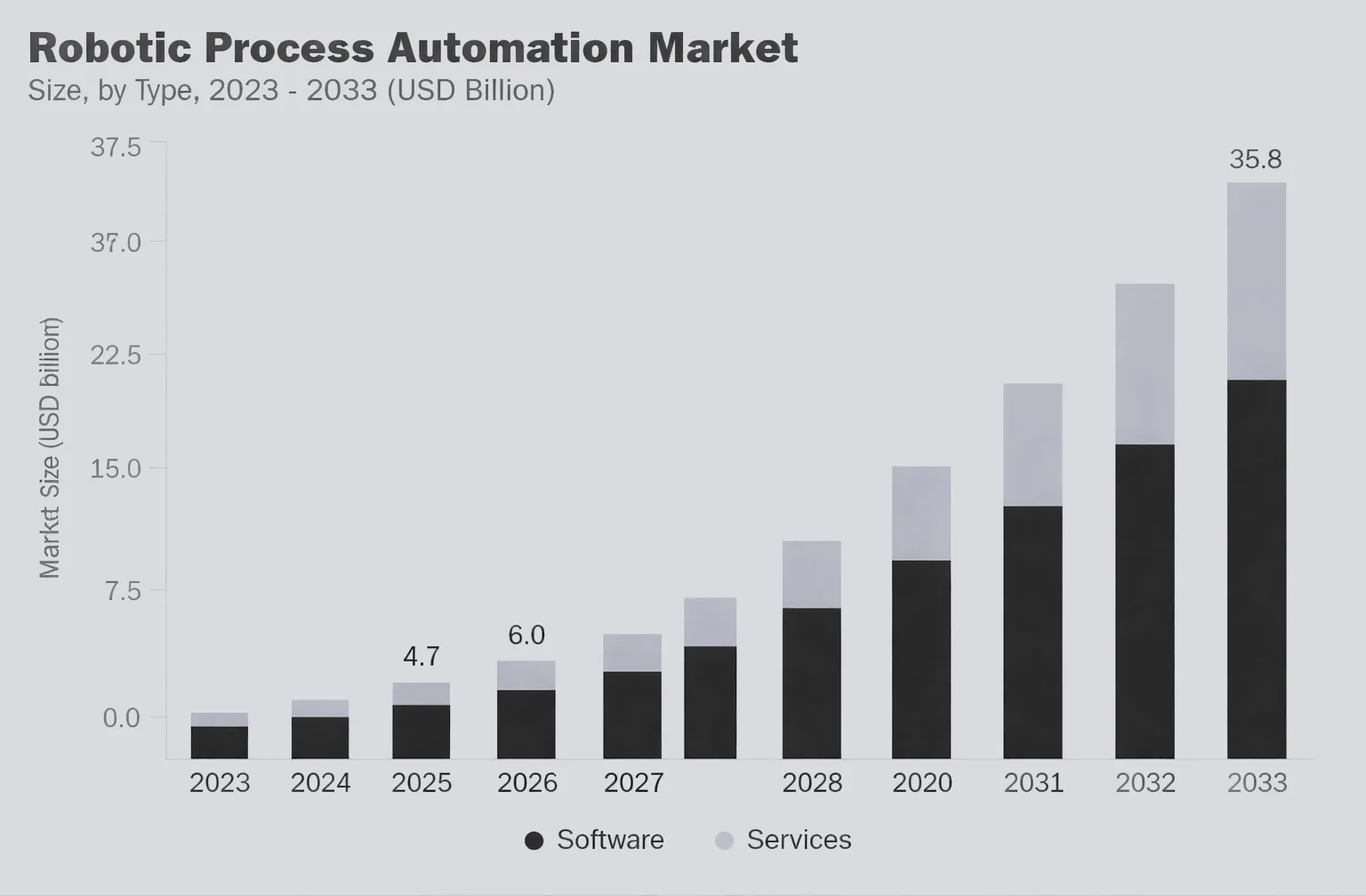
You are not alone. As companies demand operational efficiencies that deliver rapid results, decision-makers across industries are turning to automation to increase productivity. The predictions surrounding the growth of enterprise adoption of robotic process automation (RPA) as a core part of their transformation plans clearly illustrate this trend. By 2033, it is estimated that the global RPA marketplace will exceed $35.84 billion, indicating how quickly this trend is occurring.
From banking to insurance and retail to supply chains, businesses are finding new ways to accomplish tasks. The driver behind this change is RPA. RPA is automation that is based on the use of software rather than robotics in the physical context.
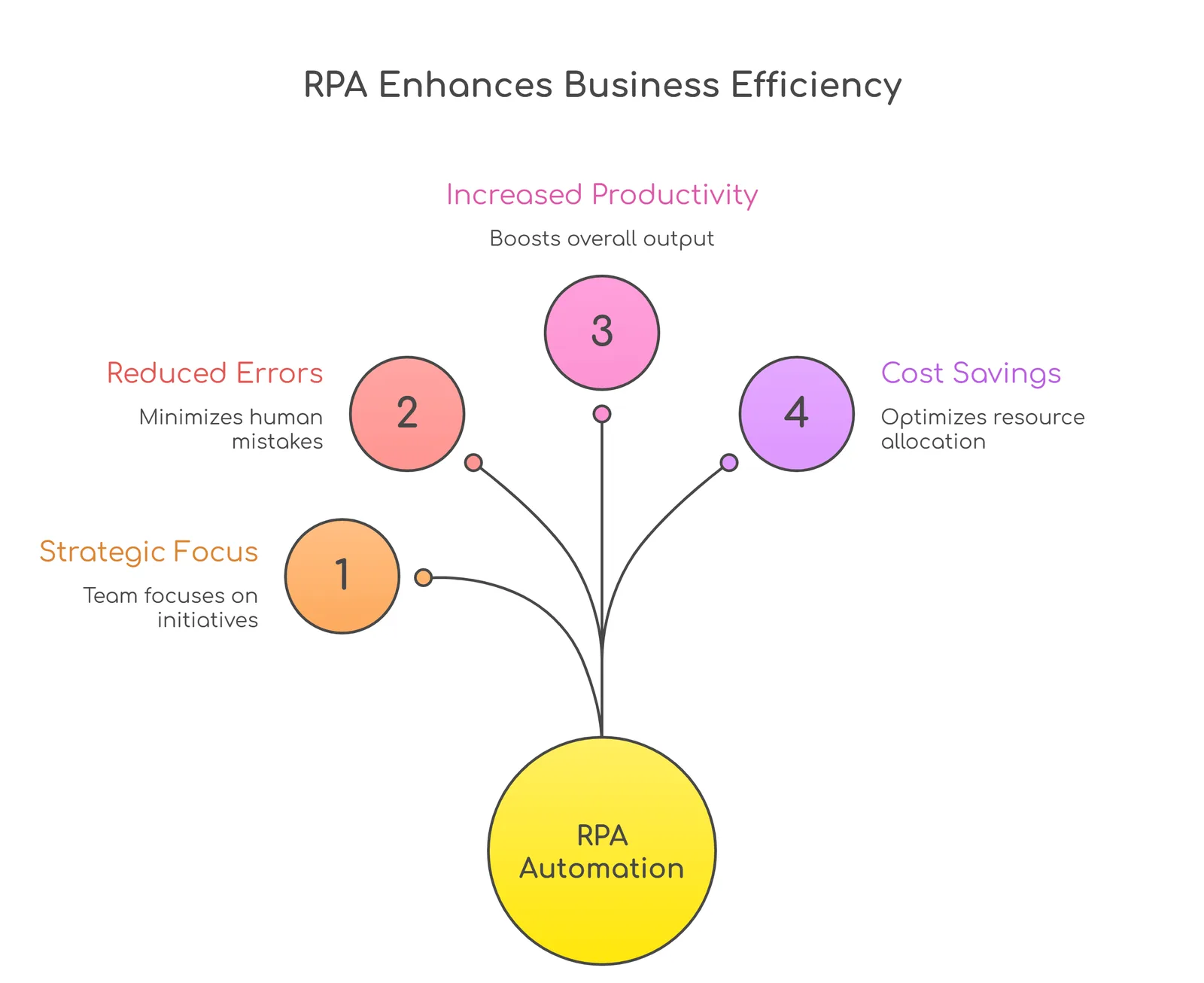
Automated processes perform repetitive (i.e., rule-based), high-speed, and highly accurate functions, producing an enormous reduction in manual errors and significantly improving operational speed and efficiency, allowing employees to support more value-added functions.
Would you like to see the extent of RPA adoption?
Robotic process automation implementation by the numbers…
By looking at the statistics below, you will understand how many companies are beginning their automation journeys. The figures will show you that automation is no longer something that will happen, but it is now here, and companies are using it to improve their operations.
- The forecast for the global RPA industry is projected to exceed $25 Billion by the year 2030, and we are seeing a steady and strong increase in adoption across business sectors.
- Many companies have used RPA in some capacity, and more than 25% of companies are currently planning to expand their use of automation.
- The businesses that have currently implemented RPA have reported that they have achieved cost savings of up to 30% - 50% on repetitive and rule-based activities.
- The use of RPA is nearly 100% accurate in improving processes, thereby reducing the opportunity for human error in tasks such as data entry, reporting, etc.
- The implementation of RPA has improved the productivity of companies by as much as 40%, enabling teams to concentrate on higher-value work.
These statistics indicate a clear change in the operational characteristics of businesses. The objective of RPA is not only to reduce costs, but also to increase the efficiency, accuracy, and agility of the business.
The key takeaway for leaders is that the conversation is no longer about whether or not to implement RPA because it has moved on to how quickly organisations can do so in order to remain competitive.
But here is the real question for decision-makers,
Are your current systems helping you do things better than previously, or are they just hindering you without having any effect?
Today's businesses need to be able to adapt, respond faster than ever before, and always make improvements to their processes in real-time. Digital Transformation and RPA (Robotic Process Automation) are both key enablers for your organisation and its processes to operate similarly to connected intelligent systems.
Using a proper methodology, RPA can enable your organisation to automate large volumes on a near real-time basis, have real-time visibility into its business processes, and design processes that provide operational efficiencies while being responsive to changes in the business environment. This provides the ability to build a business model that has the capacity to identify value, learn from the data, and take action in real-time to adapt to the changes.
This article will outline the steps for robotic process automation implementation, along with how to appropriately utilize the combination of your existing systems and RPA technology to provide an agile and future-proof work environment for your organisation.
What is Robotic Process Automation (RPA) and how does it work?
RPA allows systems and software applications to connect like how people use systems and applications. RPA is possible through the combined use of application programming interfaces (APIs) and user interface (UI) actions, enabling one-to-many. In other words, an RPA software bot executes tasks using pre-defined rules and processes, just like a human employee.
RPA's ability to perform high-volume, repetitive work consistently and quickly without fatigue (i.e., they can work 24/7) reduces errors and frees people from routine activities, so they can concentrate on the work that requires real decision-making, creativity, and problem-solving.
Business executives feel the benefits of RPA immediately. By streamlining business processes and operations, RPA enables operations to be more efficient, providing an opportunity to save money and time without going through costly system changes. Additionally, by making business processes faster, RPA helps accelerate digital transformation. As a result, corporate resources are used more effectively (e.g., teams can provide higher-quality results with the same or fewer resources), producing a higher return on investment (ROI).
And, how does it work?
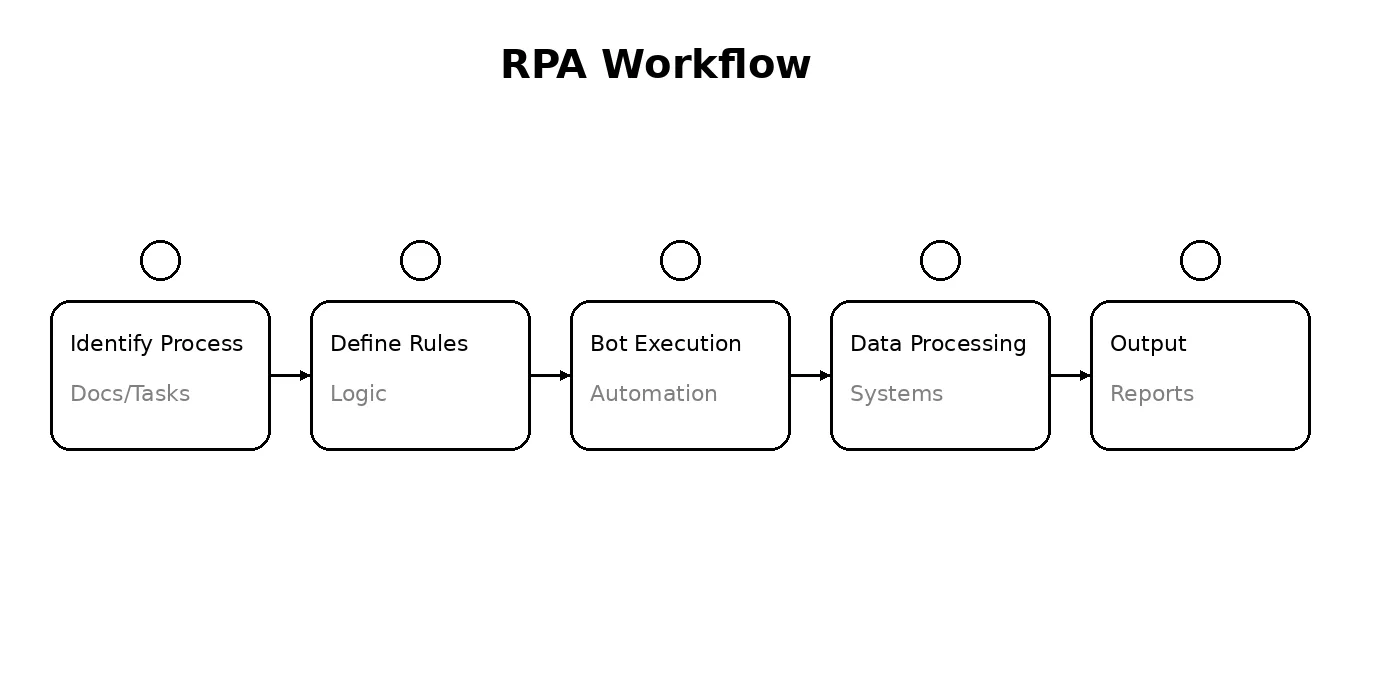
Robotic Process Automation (RPA) uses software robots that perform repetitive tasks by replicating the same actions across digital platforms. RPA is an overlay that works alongside existing software applications and uses the same functionality as the user- mouse clicks, keyboard entry, copy and paste, and uploading (downloading) files, entering data, and executing processes.
When using RPA, the first step is to identify which business processes will be the best candidates for automation:
1. Identify the Right Process
The task for RPA should be standardized, rule-based, and run at high volumes.
Example: Data entry, invoice processing, report generation, or customer onboarding steps.
2. Defining the Rules and Work Flow
After identifying the task, you must develop specific work instructions for the robot.
The work instructions must clearly state what the robot will do for that specific task and provide all of the details necessary for successful execution.
Example: "If an invoice has been received, extract, confirm, and enter/record it into the system."
3. Bot Development and Deployment
Once you have defined the rules and work instructions for the robot, you must configure or build the robot to perform the defined work.
These bots can:
- Log into systems
- Extract and input data
- Trigger actions across platforms
4. Execution Across Systems
The bot starts working, interacting with multiple systems just like a human would. It can run 24/7 without breaks.
Example: A bot pulls data from emails, updates it in a CRM, and generates a report automatically.
5. Monitoring and Optimization
Once deployed, bots are monitored to ensure everything runs smoothly. Over time, processes can be optimized for better efficiency.
What makes RPA so effective?
- It works with existing systems, so no major overhaul is needed
- It reduces errors by following rules consistently
- It speeds up processes significantly
- It frees up human teams for more strategic work
How to implement robotic process automation in your business?
Implementing RPA is not just about deploying bots and expecting instant results. It is about identifying the right opportunities, setting clear goals, and building a structured approach so automation actually adds value instead of creating confusion.
Here is a step-by-step way to implement RPA effectively in your business…
1. Start with the Right Processes
Not every task needs automation. The best place to begin is with processes that are repetitive, rule-based, and time-consuming.
Look for tasks like:
- Data entry and data migration
- Invoice and payroll processing
- Report generation
- Customer onboarding steps
Why this matters:
Starting with the right processes ensures quick wins and builds confidence in automation.
2. Map and Understand the Workflow
Before automating anything, you need to clearly understand how the process works today.
Break it down step by step:
- What triggers the process?
- What systems are involved?
- Where are the delays or errors happening?
Example: If you are automating invoice processing, map how invoices are received, validated, and recorded.
3. Define Clear Rules and Objectives
RPA works best when processes follow clear logic.
Set rules like:
- What conditions should trigger actions
- What data needs to be extracted or updated
- What happens if something goes wrong
At the same time, define what success looks like:
- Faster processing time
- Reduced errors
- Cost savings
4. Choose the Right RPA Tools
There are multiple RPA platforms available, each with different capabilities.
Your choice should depend on:
- Ease of integration with your existing systems
- Scalability for future needs
- Security and compliance requirements
The goal is to pick a tool that fits your business, not force your business to fit the tool.
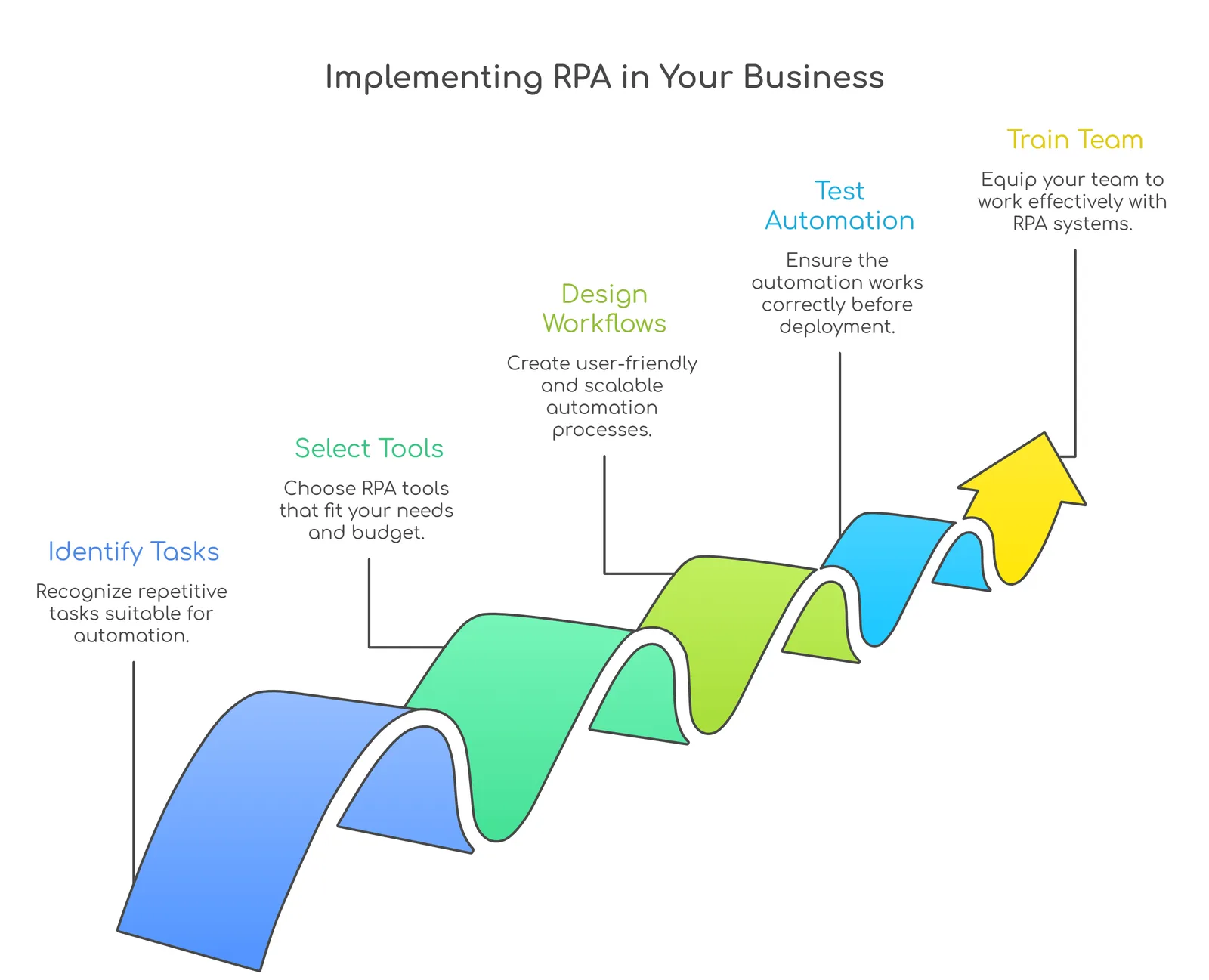
5. Develop and Test Bots
Once everything is defined, bots are configured to follow the workflow.
Testing is critical here. Run the bot in a controlled environment to:
- Identify errors
- Check accuracy
- Ensure it handles exceptions properly
Example: Test how the bot behaves when it encounters missing or incorrect data.
6. Deploy in Phases
Avoid automating everything at once.
Start small with one or two processes, monitor performance, and then expand gradually.
Why this works:
It reduces risk and allows your team to adapt to the new system smoothly.
7. Train Your Team
Automation does not replace people; it changes how they work.
Train your team to:
- Work alongside bots
- Handle exceptions
- Monitor automated processes
This ensures a smoother transition and better adoption.
8. Monitor and Optimize Continuously
RPA is not a one-time setup.
Track performance regularly:
- Are processes faster?
- Are errors reduced?
- Is the bot handling all scenarios correctly?
Over time, refine workflows and add more automation where needed.
9. Scale Across the Organization
Once you see results, expand RPA to other departments.
Example: From finance to HR, customer support, and operations. This is where RPA starts creating real impact at scale.
Common Mistakes to Avoid
- Automating inefficient processes without improving them first
- Skipping proper testing
- Trying to automate everything at once
- Ignoring change management for teams
RPA implementation is about rethinking how work gets done. When done right, it helps you save time, reduce costs, and improve accuracy. More importantly, it allows your team to focus on work that actually drives growth.
Why should you be implementing RPA in your business?
All businesses struggle with having to do more with less these days. The pressure is on every day for every business to improve how fast they process transactions/operations, decrease the number of errors made when doing so, provide a better customer experience, and accomplish all of this while keeping prices at a constant level (or lower), etc...
The big question is how long can these manual processes continue to meet the increasing demands that have been placed on them?
RPA technology provides one way in which to help solve this problem.
RPA provides a way for employees (and their employers) to free up hours of time spent doing low-value repetitive/temporal activity (activities such as data entry, generating reports, processing invoices, and transferring data between applications).
These activities can be completed by 'bots' (software robots) far quicker (and more accurately) than any person can perform them. By doing this, companies allow employees to focus their time and energy on tasks requiring human intelligence (tasks such as decision making, creating strategies, developing new products/services, communicating with customers, etc.).
1. Saves Time Where It Matters
Manual processes slow teams down, especially when the same task is repeated multiple times a day.
With RPA, these tasks run automatically in the background.
Example: A process that takes 2 hours daily can be completed in minutes without manual effort.
2. Reduces Errors and Improves Accuracy
Even the most efficient teams can make mistakes when handling repetitive work.
RPA follows predefined rules, so the chances of errors drop significantly.
Result: More reliable data, fewer corrections, and smoother operations.
3. Helps You Scale Without Adding Pressure
As your business grows, so does the workload.
Instead of hiring more people for repetitive tasks, RPA allows you to handle higher volumes without increasing operational stress.
Example: Processing 100 transactions or 10,000 transactions can happen with the same system.
4. Improves Employee Productivity
No one enjoys doing repetitive work all day.
By automating routine tasks, employees can focus on more meaningful and engaging work.
Result: Better productivity, higher job satisfaction, and more value from your team.
5. Works with Your Existing Systems
One of the biggest advantages of RPA is that it does not require you to replace your current systems.
It works on top of them, interacting just like a human would.
Example: A bot can pull data from one system and update it in another without needing deep integration.
6. Enhances Customer Experience
Faster processes mean faster responses.
Whether it is onboarding a customer, processing a request, or resolving a query, RPA helps reduce delays.
Example: Customer requests that used to take hours can now be handled almost instantly.
7. Supports Better Decision-Making
With automation handling routine tasks, businesses can focus more on insights and strategy.
RPA also ensures data is processed and updated in real time, giving leaders better visibility.
8. Delivers Long-Term Cost Efficiency
While there is an initial investment, the long-term savings are significant.
Reduced manual effort, fewer errors, and faster processes all contribute to lower operational costs over time.
RPA is all about working smarter. It helps businesses become faster, more efficient, and more adaptable without completely overhauling their existing systems. And in a world where speed and accuracy matter more than ever, that shift can make all the difference.
Use cases of Robotic Process Automation: Industry-wise
Regardless of which department within a company (sales, HR, marketing, etc.), there are common, repetitive steps that need to be performed on a daily basis, and these steps typically involve structured data.
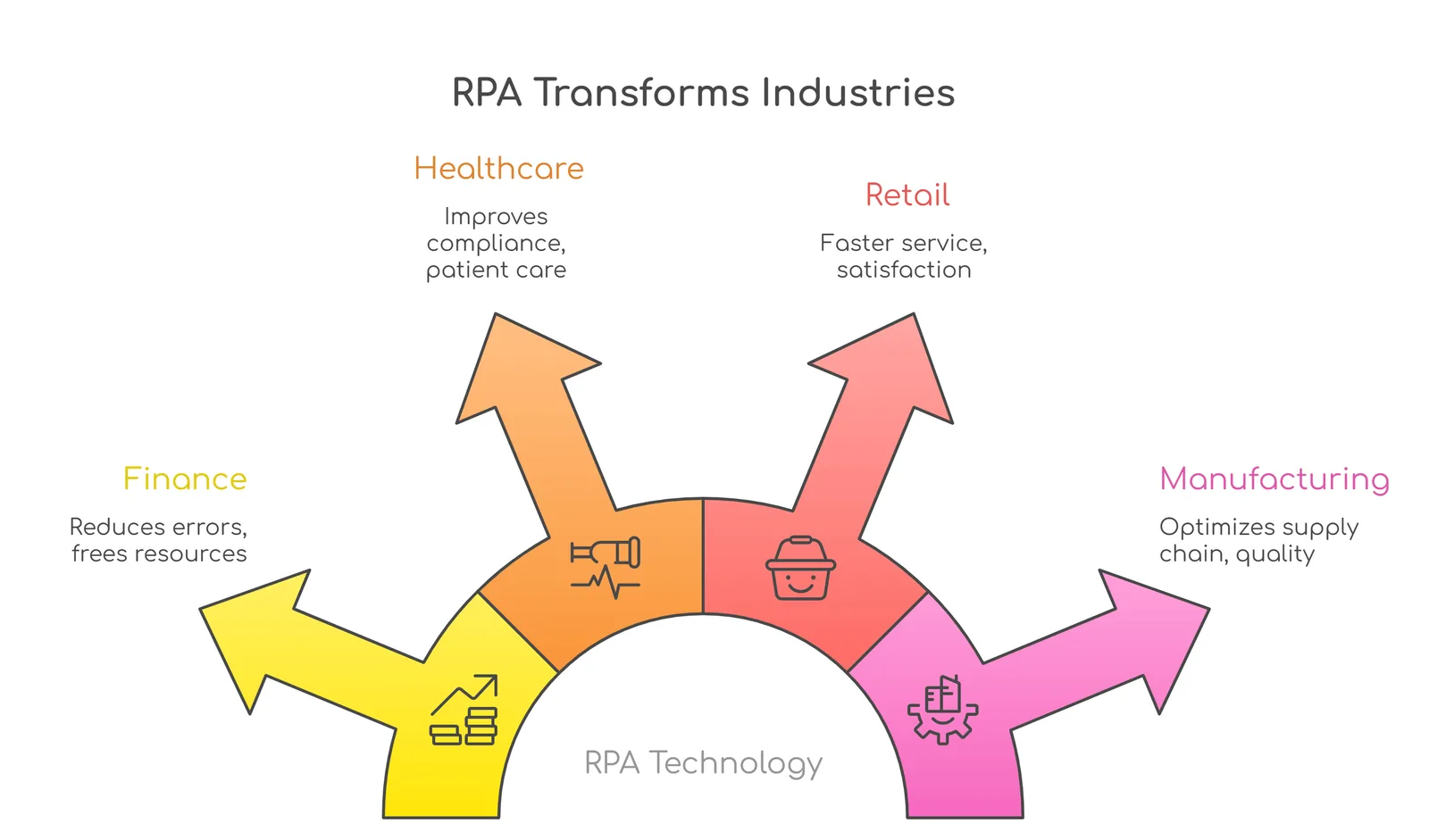
RPA can help these industries save time and effort by automating the repetitive tasks that companies go through. RPA has all the advantages to automate many types of business processes that require speed and accuracy, and has proven to be effective in many different ways across many industries.
To better understand the various uses of RPA across various sectors of business, let's examine some of the specific use cases...
1. Banking and Financial Services
This is one of the earliest adopters of RPA, mainly because of the high volume of transactions and strict compliance requirements.
Where RPA fits:
- Account opening and KYC verification
- Loan processing and credit checks
- Fraud detection and compliance reporting
- Transaction monitoring
Example: A bank uses RPA to verify customer documents, extract data, and update multiple systems in minutes instead of hours.
Impact: Faster processing, fewer errors, and better compliance.
2. Insurance
Insurance processes are often document-heavy and time-consuming, which makes them ideal for automation.
Where RPA fits:
- Claims processing and validation
- Policy issuance and renewals
- Customer onboarding
- Data extraction from forms
Example: An insurance company automates claim validation by extracting data from submitted documents and cross-checking it instantly.
Impact: Quicker claims settlement and improved customer satisfaction.
3. Healthcare
Healthcare organizations deal with large amounts of data and administrative work that can slow down operations.
Where RPA fits:
- Patient registration and data entry
- Appointment scheduling
- Billing and insurance claims processing
- Medical records management
Example: A hospital uses RPA to automate patient data entry and billing, reducing manual workload for staff.
Impact: More time for patient care and fewer administrative delays.
4. Retail and eCommerce
Retail businesses need to manage inventory, orders, and customer interactions in real time.
Where RPA fits:
- Order processing and tracking
- Inventory updates
- Price monitoring
- Customer support automation
Example: An eCommerce company uses RPA to update inventory across platforms and process orders automatically.
Impact: Faster order fulfillment and better customer experience.
5. Manufacturing and Supply Chain
Operations here depend on accuracy, timing, and coordination across multiple systems.
Where RPA fits:
- Inventory and order management
- Vendor communication
- Invoice processing
- Shipment tracking
Example: A manufacturing firm automates purchase order creation and invoice matching to reduce delays.
Impact: Improved efficiency and reduced operational bottlenecks.
6. Human Resources
HR teams handle repetitive processes that can easily be automated.
Where RPA fits:
- Resume screening and shortlisting
- Employee onboarding
- Payroll processing
- Attendance tracking
Example: An HR team uses RPA to automate onboarding by collecting documents and updating employee records.
Impact: Faster hiring processes and better employee experience.
7. Telecommunications
Telecom companies manage large customer bases and complex operations.
Where RPA fits:
- Customer onboarding
- Billing and invoice generation
- Network issue tracking
- Service requests handling
Example: A telecom provider automates billing processes and customer data updates.
Impact: Reduced errors and faster service delivery.
8. Logistics and Transportation
This industry relies heavily on coordination and real-time updates.
Where RPA fits:
- Shipment tracking updates
- Documentation and compliance
- Route planning data processing
- Invoice generation
Example: A logistics company automates shipment status updates across systems.
Impact: Better visibility and smoother operations.
9. Finance and Accounting
Even outside banking, finance functions in any organization benefit from RPA.
Where RPA fits:
- Invoice processing
- Accounts payable and receivable
- Financial reporting
- Reconciliation
Example: A company automates invoice matching and payment processing.
Impact: Faster financial cycles and improved accuracy.
RPA is not tied to a single industry or function. It fits wherever there is repetition, structure, and a need for efficiency. What is interesting is how businesses are now moving beyond basic automation and using RPA as a stepping stone towards smarter, more connected operations. The more you explore it, the more opportunities you start to see within your own processes.
Understanding RPA + AI | Intelligent Process Automation
Automation has evolved beyond simple rule-based functions into a more powerful means of improving business efficiencies and productivity through the use of intelligent automation. According to industry estimates, the market for intelligent document processing alone is projected to reach over $12.35 billion by 2030, which demonstrates how quickly companies are moving toward more advanced forms of automation.
Intelligent Process Automation (IPA) is a prime example of how this type of intelligent automation can be created by integrating multiple technologies, such as robotic process automation (RPA), artificial intelligence (AI), machine learning (ML), and optical character recognition (OCR).
Whereas traditional automation follows a predetermined set of rules, IPA uses contextual understanding, learns from historical data, and continually improves its performance. It does not simply perform tasks; instead, it understands what is happening with the information being processed to facilitate smarter decision-making.
What is Intelligent RPA?
You can think of Intelligent RPA as the next step beyond basic automation. While traditional RPA handles structured, repetitive tasks, Intelligent RPA adds a layer of intelligence on top of it.
This means bots are no longer just following instructions. They can:
- Understand unstructured data like documents or emails
- Learn from past interactions
- Adapt to changing scenarios
In simple terms, it is automation that not only works but also thinks and improves.
Benefits of Intelligent Process Automation
1. More Streamlined Operations
RPA is great at handling repetitive tasks, but it struggles when data is unstructured or requires interpretation. This is where AI enhances the process.
Technologies like text recognition, entity extraction, and natural language processing help systems understand the meaning behind the data, not just the data itself.
Example: In document processing, the system can read invoices, extract key details, and understand relationships between data points without manual input.
2. Deeper and More Actionable Insights
When RPA and AI work together, businesses get a more complete view of their data.
RPA gathers and organizes data from different systems, while AI analyzes it to identify patterns and trends that may not be obvious.
Example: An AI system might identify customer behavior patterns, such as when certain users are more likely to make a purchase or respond to offers.
This level of insight goes beyond basic reporting and helps businesses make smarter decisions.
3. Better Cost Efficiency
Automation already reduces manual effort, but adding intelligence takes it a step further.
Studies have shown that organizations implementing intelligent automation have achieved significant cost savings, often reducing operational expenses noticeably.
Example: In healthcare, RPA can handle claims processing while AI detects unusual patterns to prevent fraud. This improves efficiency and reduces unnecessary costs at the same time.
4. Stronger Compliance and Risk Management
Maintaining compliance is critical, especially in regulated industries.
RPA ensures processes are followed consistently, while AI continuously monitors data for anomalies or risks.
Example: In financial services, automation can handle regulatory checks, while AI flags suspicious transactions in real time.
This combination helps reduce risks and ensures better adherence to regulations.
The shift from basic automation to intelligent automation is a big step forward. Businesses are building systems that can understand, learn, and improve over time.
And as this technology continues to evolve, the real advantage will lie with organizations that start early and use it not just to save time, but to make smarter, faster decisions.
Cost of implementation of RPA
If you're thinking about using RPA for your company, the cost can vary depending on how simple or complex your desired automations are. The cost of implementing RPA goes beyond buying the software and deploying a bot. You must also consider process identification, workflow design, system integration, testing, and ongoing maintenance of the automated process over time.
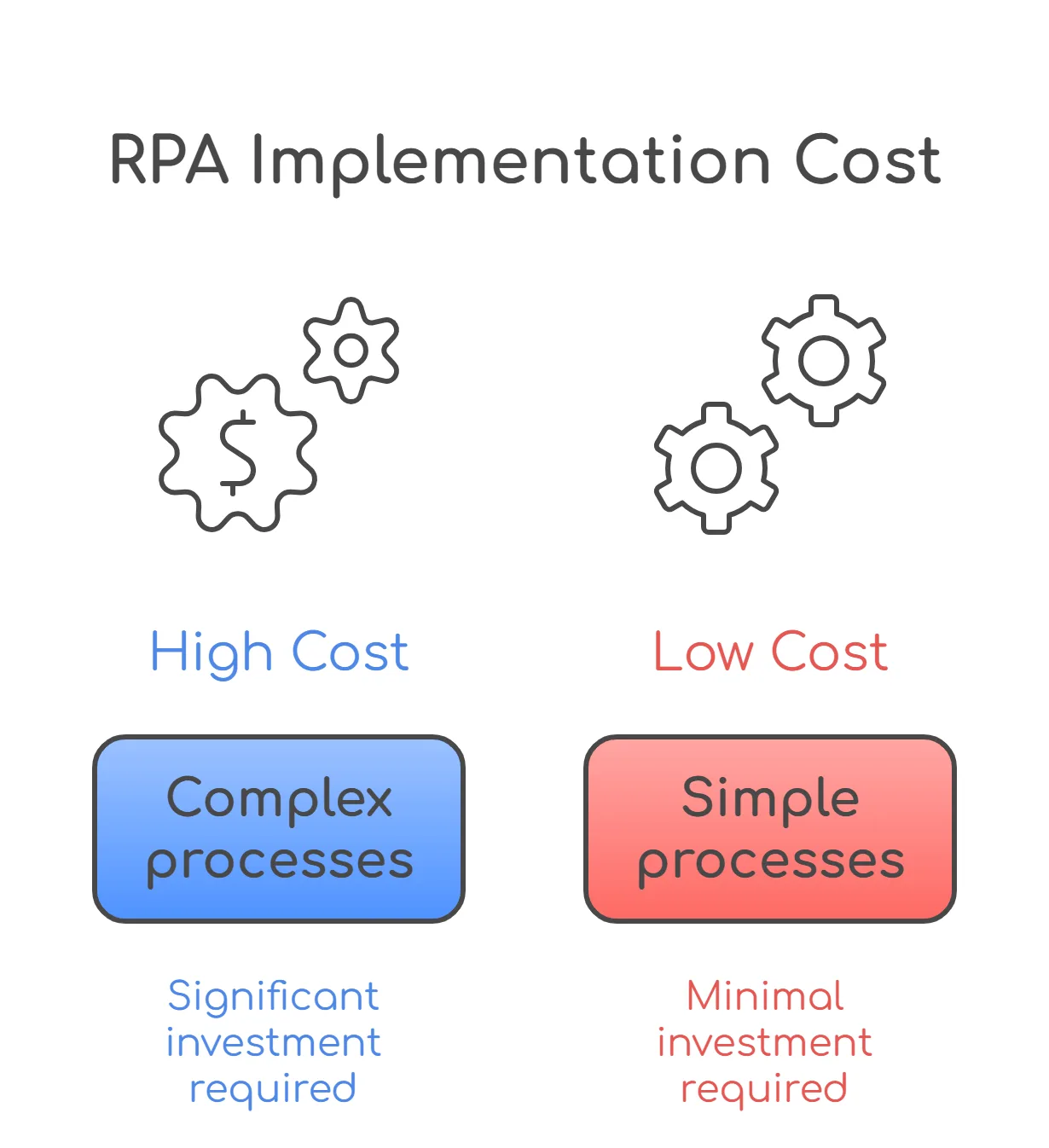
Depending on your business needs, RPA can start as a small implementation with a handful of bots to manage basic processes. However, as your organization grows, the potential for RPA to create a complete automated ecosystem across multiple departments exists. As a result, the cost of implementing RPA will depend primarily on your objectives, the level of complexity of the processes, and how comprehensively you would like automation to be integrated into your overall operations.
What Influences the Cost?
Before looking at numbers, here are the key factors that impact RPA implementation cost:
- Process complexity
Simple, rule-based tasks cost less compared to processes that involve decision-making or multiple systems.
- Number of bots
More processes usually mean more bots or more advanced bot configurations.
- Tool selection
Different RPA platforms come with different licensing and capabilities.
- Integration requirements
Connecting multiple systems, APIs, or legacy tools can increase effort and cost.
- AI and advanced capabilities
Adding machine learning, OCR, or analytics increases the overall investment.
- Maintenance and support
Ongoing monitoring, updates, and optimization also contribute to long-term costs.
Estimated Cost Comparison
Here is a simplified view of how costs scale based on the level of automation.
| RPA Level | What It Includes | Estimated Cost (USD) | Timeline |
| Simple RPA | Basic task automation, rule-based bots, and limited integrations | $5,000 - $20,000 | 2 - 6 weeks |
| Advanced RPA | Multi-step workflows, system integrations, dashboards, moderate AI usage | $20,000 - $80,000 | 2 - 4 months |
| Complex RPA | End-to-end automation, AI/ML integration, OCR, analytics, enterprise scalability | $80,000 - $200,000+ | 4 - 8+ months |
What Each Level Looks Like?
Simple RPA
Ideal for businesses just starting with automation. It focuses on repetitive, rule-based tasks with minimal dependencies.
Example: Automating data entry or report generation.
Advanced RPA
Covers more complex workflows that involve multiple systems and some level of decision-making.
Example: Automating invoice processing with validation and approvals.
Complex RPA
Designed for large-scale automation across departments with intelligent capabilities.
Example: End-to-end automation of customer onboarding with AI-based document verification.
Ongoing Costs to Consider
RPA is not a one-time investment. There are ongoing costs that businesses should plan for:
- Bot maintenance and updates
- Platform licensing fees
- Infrastructure or cloud hosting
- Process optimization and scaling
- Monitoring and support
The cost of RPA implementation should not be seen as an expense alone. It is an investment in efficiency, accuracy, and scalability.
Starting small and scaling gradually is often the smartest approach. This way, you can see real value early, refine your processes, and expand automation in a way that truly supports your business growth.
How can Antino help you out in the advanced implementation of RPA for your business?
RPA Implementation is not just about bringing in Robotic Processes, it’s also about constructing a functioning system that is truly beneficial for your organisation while allowing it to grow with your business. This is where Antino comes into the picture.
If you are looking to go beyond the small wins and really transform your business on how it operates, we can help you achieve that in a manner that is not only successful but sustainable over time. Our team has a solid understanding of technology-based solutions as well as how to map these technology solutions to your business workflows, which guarantees that you have a very successful and scalable automation journey that will be ready for the future.
Would you like to know more about the potential of automation? Contact us today and let's work together!