Ever felt like your POS system is doing almost everything you need… but not quite?
Perhaps your POS system won't accommodate your unique billing process, has issues at busy times, or requires your employees to change their work processes instead of accommodating those practices. This is the case with most point-of-sale system software that is sold commercially. They are designed for the general public, not for your specific business operations.
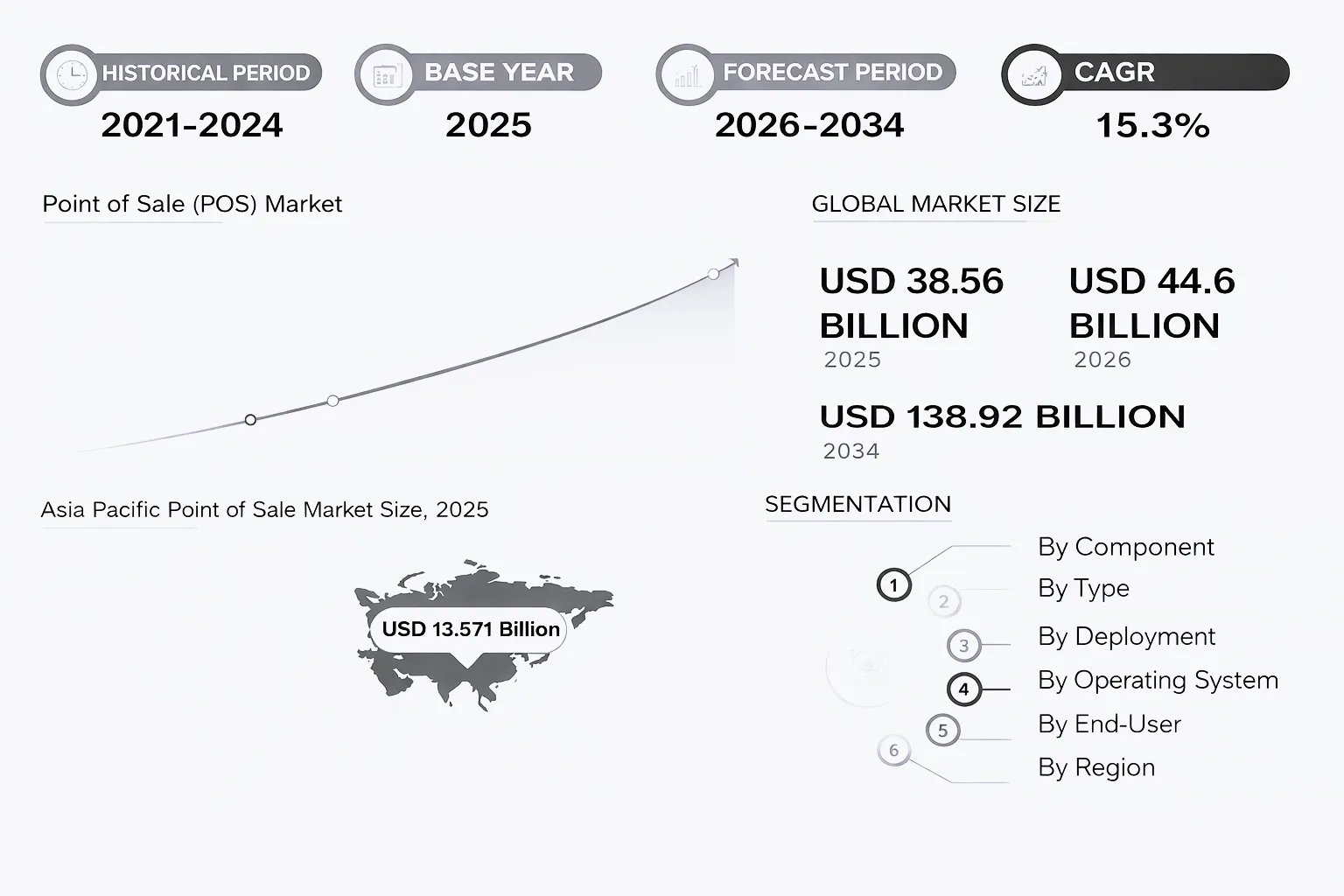
And businesses are starting to outgrow that limitation. According to recent industry insights, the global POS software market is expected to cross USD $138.92 billion by 2034, with more companies moving towards customized solutions to keep up with changing customer expectations.
It is no longer only about processing customer payments as speed, personalisation, inventory synchronisation, real-time visibility, and an effortless transition from transaction to the backend of your business are all equally important.
The most significant question is, why would you opt for a generic system to run what is far from an ordinary operation?
This is where custom point of Sale (POS) Solutions play a major role. In this article, we'll explain what custom POS software development means, why businesses around the world are turning to this option instead of traditional 'off-the-shelf' POS Solutions, the most important features, and what’s involved in developing a system that meets your specific needs.
Because today, it is not just about processing payments. It is about speed, personalization, inventory sync, real-time insights, and creating a smooth experience from checkout to backend operations.
POS System Explained
POS systems have grown tremendously beyond just being simple billing solutions. They now serve as an all-inclusive retail solution, providing retailers with one place to operate their business and manage all aspects of sales, product inventory, customer data, etc.
Due to increasing customer expectations surrounding fast and convenient service, these systems can now provide seamless shopping experiences across various channels; e.g., customers can buy something online and pick it up at a store, or order something for delivery through an app on their phone.
This fundamental shift can be attributed in large part to the proliferation of sophisticated technologies, such as artificial intelligence, smart devices, and automation. These technologies enable retailers to perform self-checkout, create intelligent recommendations for customers, and implement an automated retail environment. Furthermore, the integration of POS systems with other business tools will enable retailers to access greater insights and real-time data.
Altogether, retailers are able to operate more efficiently, which in turn, provides a superior customer experience, and remain competitive in a marketplace that is continually changing to be more digital.
What should you go for: Custom POS Software v/s Off-the-Shelf?
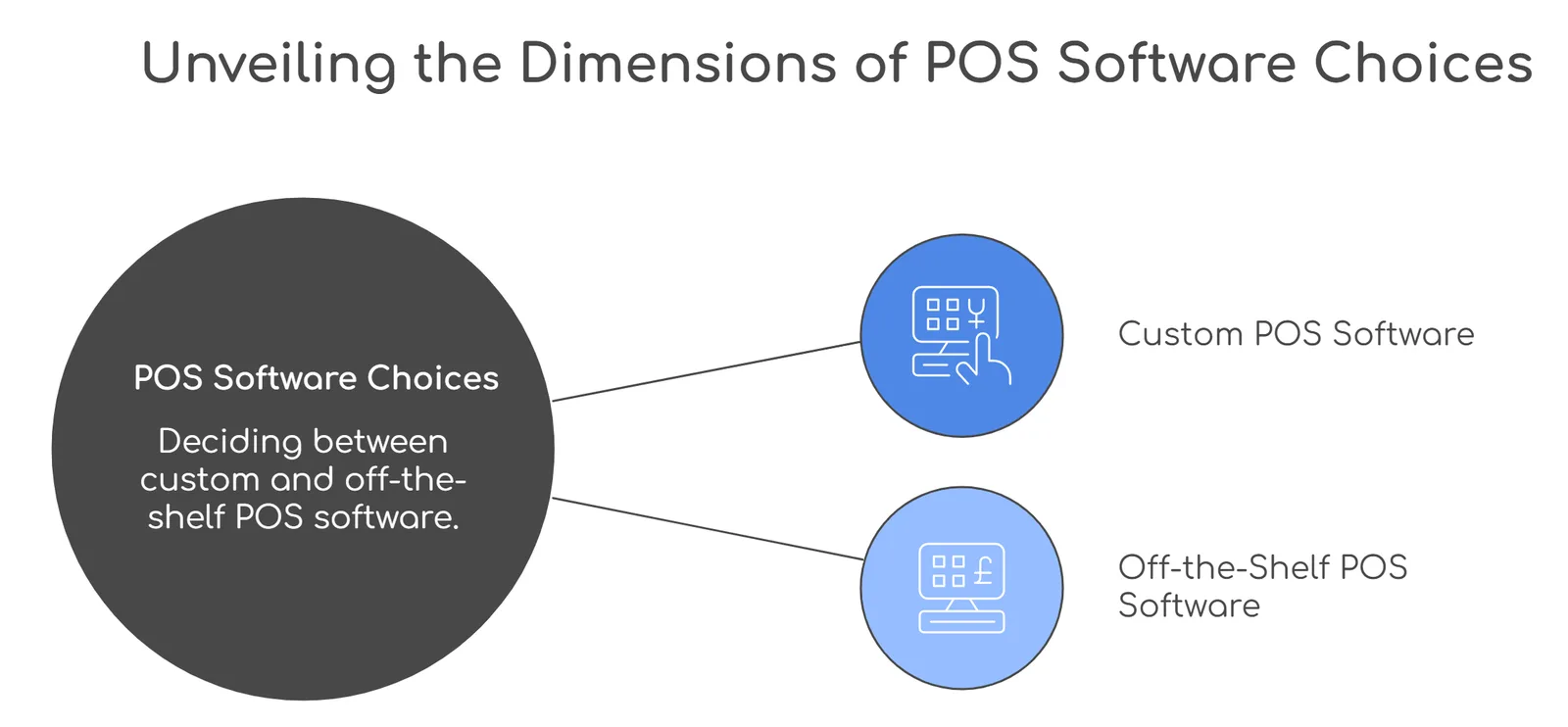
When upgrading a POS system, businesses often face the question of whether to adopt a 'ready-made' solution or develop an individually designed one. The answer to this question depends on your current business level and what you would like to achieve with your company in the future.
When using an 'off-the-shelf' POS system, they are easy to set up, making them the ideal starter solution for a small business or one that has just opened. Off-the-shelf POS systems typically have basic features such as billing, inventory tracking, and reporting, but will eventually limit your operations' options.
Whereas custom-developed POS software will allow you to tailor your solution to match your specific operational needs. Custom-built systems allow you to match your unique business processes and systems and provide an opportunity for you to grow with your business over time. Although the initial investment in developing a custom solution will be higher than purchasing an off-the-shelf system, you will have greater long-term options.
Key differences at a glance
| Factor | Off-the-Shelf POS | Custom POS Software |
| Setup Time | Quick to deploy | Takes time to design and develop |
| Cost (Initial) | Lower upfront cost | Higher initial investment |
| Customization | Limited to predefined features | Fully tailored to business needs |
| Scalability | Can become restrictive over time | Built to scale with your growth |
| Integration | Limited or generic integrations | Seamless integration with your systems |
| User Experience | Standard interface | Designed specifically for your users |
| Competitive Edge | Same as competitors using it | Unique workflows and capabilities |
| Maintenance | Managed by the provider | Flexible, based on your requirements |
So, what should you choose?
An off-the-shelf POS system is a good place to start if your business is:
- looking for something quick
- has standard operating procedures
- doesn't need heavy customizations.
However, if your business has workflows that are unique, has multiple locations, or plans to grow or scale, then a custom POS system would provide you with the ability to build your processes around the system rather than constantly having to work around the limitations of the off-the-shelf system.
The primary difference between the two systems (off-the-shelf versus custom) is that off-the-shelf is geared to the convenience of your business, and custom is geared toward the control of your business.
Ultimately, your decision comes down to whether you want to alter your business to conform to a software package or have a software package that conforms to your business.
Types of POS Systems
Every POS solution has a different intention. Something that would work in a small retail shop will not work in a restaurant environment or a growing multi-location business. It's important to know what you're looking for when selecting a POS based on your business model, how fast you operate, and/or if you want to maintain complete control of your POS systems and your data processes.
The most popular POS systems will be discussed with examples of when they might be used...
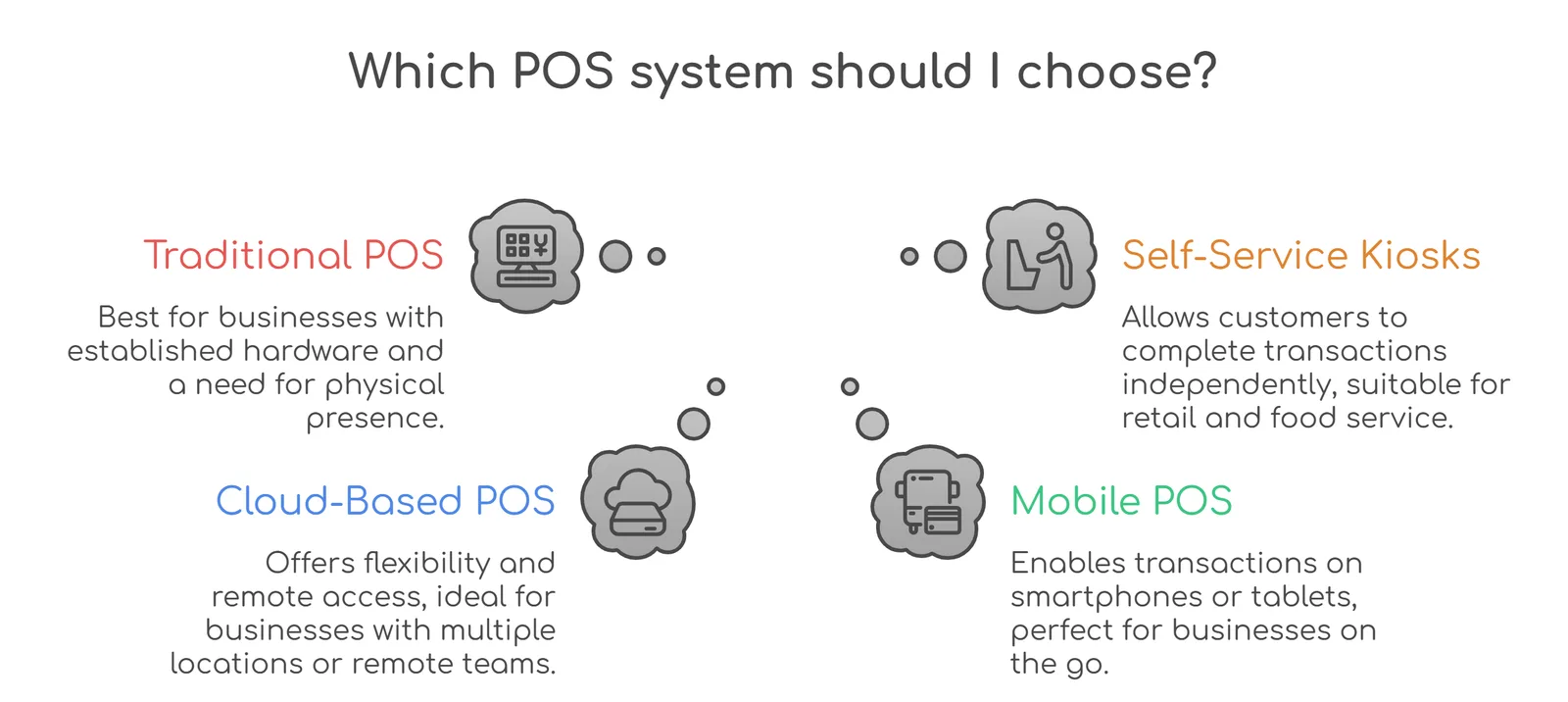
1. Traditional or On-Premise POS Systems
These are the original style of POS systems, consisting of hardware located in the store and managed by a local server (no internet required).
The strength of these systems is that they can operate in an environment where the internet might not be available/operational..
Where it works best:
Retailer-type business that wants control over its POS system & data.
Example:
Supermarket with a traditional checkout counter at the store, all transactions take place locally without needing to operate on the cloud.
2. Cloud-Based POS Systems
These systems run on the cloud and can be accessed from anywhere with an internet connection.
They are more flexible and allow real-time syncing of data across locations.
Where it works best:
Businesses with multiple outlets or those that need remote access to sales and inventory data.
Example:
A retail chain owner checks daily sales, inventory, and performance across stores from their phone.
3. Mobile POS Systems (mPOS)
These are POS systems that run on smartphones or tablets.
They are lightweight, easy to use, and perfect for businesses that need mobility.
Where it works best:
Pop-up stores, small vendors, food trucks, or businesses that operate on the go.
Example:
A café staff taking orders and payments directly at the table using a tablet instead of sending customers to a billing counter.
4. Self-Service POS Systems
These systems allow customers to complete transactions on their own without staff assistance.
They are commonly seen in fast-paced environments to reduce queues and improve efficiency.
Where it works best:
Quick-service restaurants, cinemas, and retail stores with high footfall.
Example:
A customer places an order and pays for their order through a kiosk without waiting in line.
5. Tablet-Based POS Systems
These are similar to mobile POS but are usually designed with a more structured setup using tablets.
They are modern, easy to deploy, and offer a clean user experience.
Where it works best:
Restaurants, salons, and boutique stores that want a sleek and flexible setup.
Example:
A salon managing bookings, billing, and customer history through a tablet-based POS.
6. Multichannel POS Systems
These systems are designed to handle both online and offline sales in one place.
They sync inventory, orders, and customer data across different sales channels.
Where it works best:
Businesses are selling through both physical stores and eCommerce platforms.
Example:
A clothing brand managing in-store sales and online orders from a single dashboard.
7. Industry-Specific POS Systems
These are built specifically for certain industries like restaurants, retail, healthcare, or hospitality.
They come with features tailored to specific business needs.
Where it works best:
Businesses that require specialized workflows.
Example:
A restaurant POS that manages table reservations, kitchen orders, and billing seamlessly.
Choosing the right type of POS system is not just about features. It is about finding what fits your daily operations without slowing you down. The right system should feel like a natural extension of your business, helping you move faster, serve better, and stay in control as you grow.
Must-Have Features in a POS System
A POS system today is not just a billing tool. It sits at the center of your operations, connecting sales, inventory, customers, and insights in one place. So when you are building or choosing a POS system, the focus should not just be on “can it bill?” but “can it actually make running the business easier?”
Here are the features that truly matter…
1. Fast and Flexible Billing
Billing is the core of any POS, but speed and flexibility make the difference.
Your system should handle multiple payment methods, split bills, discounts, and returns without slowing things down.
Example:
During peak hours, a retail store processes multiple payments in seconds without lag or errors.
2. Real-Time Inventory Management
Knowing what is in stock at any moment is critical.
A good POS automatically updates inventory with every sale, return, or restock, so you never have to guess.
Example:
A product goes out of stock, and the system instantly reflects it across all stores and channels.
3. Sales Reporting and Analytics
Data is what helps you make better decisions.
Your POS should provide clear reports on sales, best-selling products, peak hours, and overall performance.
Example:
A business owner checks daily reports and identifies which products are driving the most revenue.
4. Multi-Location Management
If you have more than one outlet, managing everything from a single place becomes essential.
A POS should sync data across locations and give you a unified view.
Example:
A retail chain tracks sales and inventory across all stores from one dashboard.
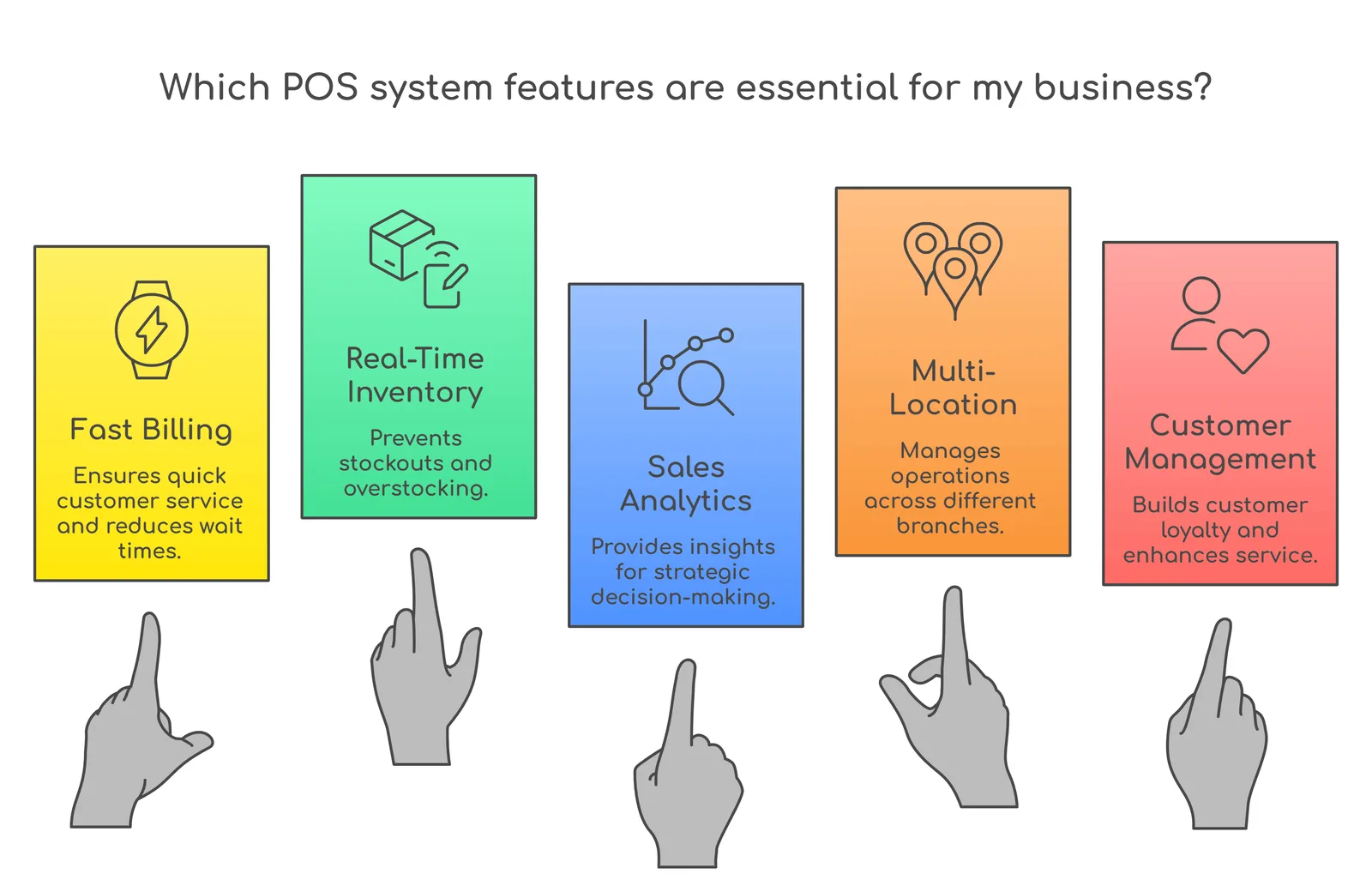
5. Customer Management (CRM)
Understanding your customers helps you serve them better.
A POS should store customer data, track purchase history, and enable personalized offers.
Example:
A returning customer gets a tailored discount based on past purchases.
6. Seamless Integrations
Your POS should not work in isolation.
It should connect easily with payment gateways, accounting software, eCommerce platforms, and other tools you use.
Example:
Sales data automatically syncs with accounting software without manual entry.
7. User-Friendly Interface
No one wants to spend hours learning how to use a POS system.
The interface should be simple, intuitive, and easy for staff to adopt quickly.
Example:
New employees can start using the system with minimal training.
8. Offline Functionality
Internet issues should not stop your business.
A reliable POS should continue to work offline and sync data once the connection is restored.
Example:
A store continues billing even during a network outage and updates data later.
9. Security and Access Control
With financial and customer data involved, security is non-negotiable.
Role-based access ensures that only authorized users can perform certain actions.
Example:
Only managers can approve refunds or access detailed financial reports.
10. Returns and Refund Management
Handling returns smoothly is just as important as making a sale.
Your POS should make refunds, exchanges, and adjustments simple and trackable.
Example:
A customer returns a product, and the system updates inventory and processes the refund instantly.
11. AI-Based Insights and Forecasting
Modern POS systems can use data to predict trends and suggest actions.
Example:
The system alerts you about products likely to run out of stock based on past sales patterns.
12. Loyalty Programs and Rewards
Keeping customers coming back is key.
A POS can track loyalty points and offer rewards automatically.
Example:
A customer earns points on every purchase and redeems them later without manual tracking.
13. Mobile and Remote Access
Business owners do not always sit in the store.
Being able to access reports and data remotely adds flexibility.
Example:
An owner checks live sales data while traveling.
14. Omnichannel Support
Customers shop across multiple channels today.
A POS should connect online and offline sales seamlessly.
Example:
An online order reflects in the same inventory system as in-store sales.
A good POS system does not just manage transactions. It supports your entire business flow. The right mix of essential and advanced features can save time, reduce errors, and help you make smarter decisions. And when everything works smoothly behind the scenes, it shows in the experience you deliver to your customers.
How does a POS System work for a business?
At its core, a POS system helps a business take payments and keep track of what is being sold. Sounds simple, right? But in reality, it does a lot more behind the scenes. Whether you run a physical store, an online shop, or both, a POS system adapts to how your business operates.
Earlier, POS simply meant a cash register at the counter. Today, it has evolved into a complete digital system. You can bill customers, track sales, and manage inventory from anywhere using just a phone, tablet, or computer with internet access.
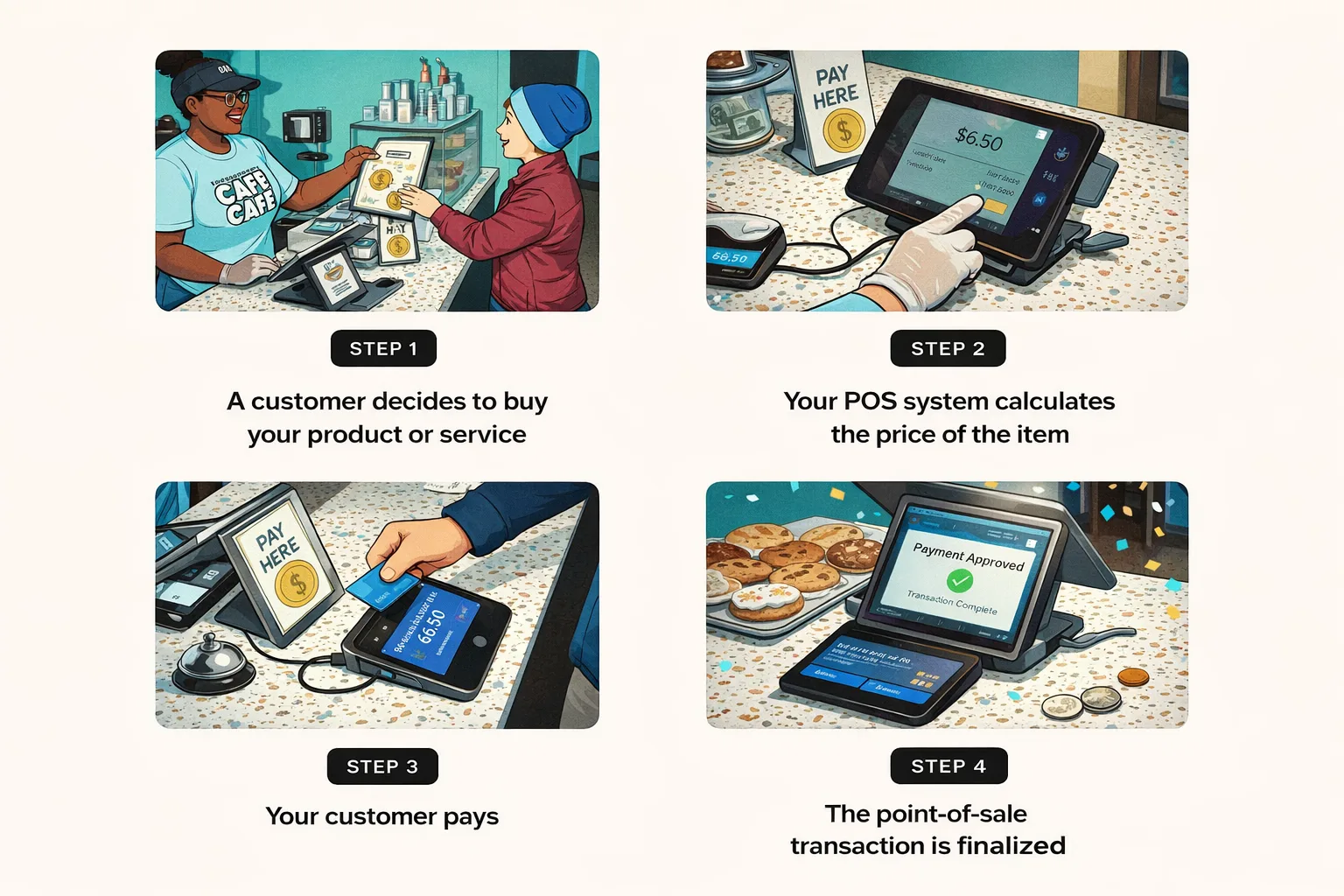
So, how does the whole process actually work? Here is a simple breakdown…
1. A customer decides to make a purchase
In a physical store, a customer brings their items to the counter, where a staff member scans them using a barcode scanner or even a mobile device. Some systems also allow scanning directly through the device's camera.
In an online setup, this step happens when the customer adds products to their cart and proceeds to checkout.
2. The system calculates the total amount
Once the items are selected, the POS software system automatically calculates the total price. This includes taxes, discounts, or any ongoing offers. At the same time, it updates the inventory to reflect that the item is being sold.
3. The customer makes the payment
Customers can choose how they want to pay. This could be through cards, UPI, digital wallet, cash, or even loyalty points or gift cards.
The system then connects with the payment provider to verify and approve the transaction.
4. The sale is completed
Once the payment is successful, the transaction is finalized. The POS software generates a receipt, either digital or printed, and the customer receives their product or service.
Therefore, a POS system takes care of the entire checkout journey, from selecting products to completing the payment and updating records. For businesses, be it small or big, this means fewer manual tasks, better tracking, and a smoother experience for both staff and customers.
Cost to Develop Custom POS Software
A bespoke point-of-sale (POS) system is not a fixed-cost solution, as the price will be determined based on the level of complexity of the implemented system, as well as an office's daily business operations.
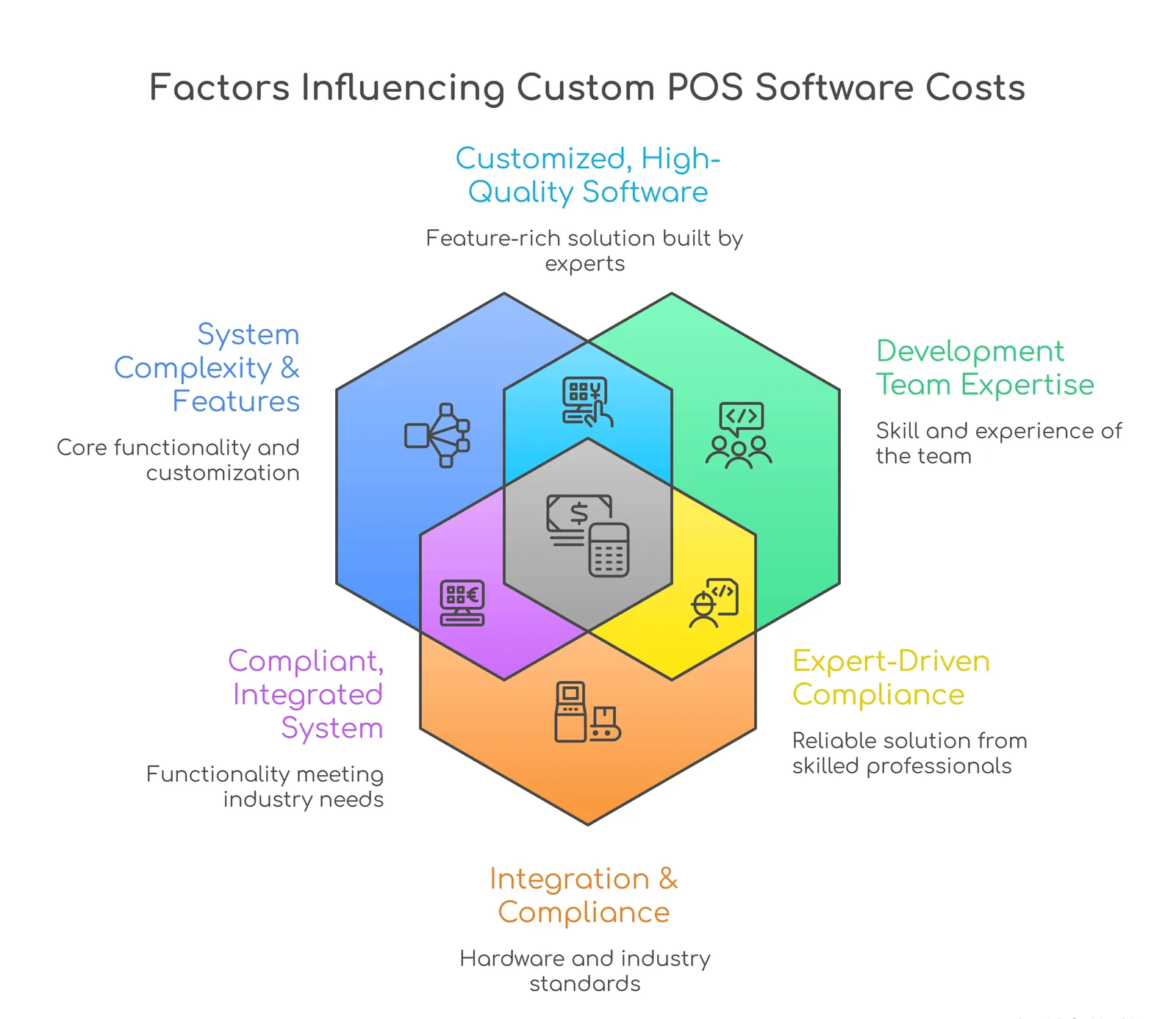
A small café or take-out will not have the same requirements as a multi-location retailer. The café may only need basic billing and inventory, while the retail chain would require additional functionality such as integration with other systems, an analytical reporting dashboard, and real-time sync between locations. As a result, the price for these two solutions will differ significantly.
What impacts the cost?
Before jumping into numbers, it helps to understand what actually drives the cost…
- Feature set
Basic billing will cost far less than a system with CRM, analytics, and AI-driven insights.
- Platform and devices
Whether you are building for desktop, tablet, mobile, or all three will affect the budget.
- UI/UX design
A clean, intuitive interface requires proper design effort and testing.
- Backend and database
Handling real-time data, inventory, and transactions requires a strong backend setup.
- Integrations
Payment gateways, accounting tools, eCommerce platforms, and third-party APIs add complexity.
- Scalability requirements
If you plan to expand to multiple locations, the system needs to be built accordingly.
- Security
Since payments and sensitive data are involved, strong security measures are essential.
Estimated Cost Comparison
Here is a simple breakdown based on the level of complexity…
| POS Type | Features Included | Estimated Cost (USD) | Timeline |
| Basic POS | Billing, basic inventory, simple reports, limited integrations | $10,000 - $25,000 | 1.5 - 3 months |
| Mid-Level POS | Inventory management, CRM, multi-payment support, integrations, and dashboards | $25,000 - $70,000 | 3 - 6 months |
| Advanced POS | Multi-location support, real-time sync, analytics, AI features, custom workflows | $70,000 - $150,000+ | 6 - 12+ months |
What does each level look like?
Basic POS
Best suited for small businesses just starting out. It covers essential operations but may still rely on some manual processes.
Example: A small retail store managing billing and basic stock tracking.
Mid-Level POS
A more balanced system with better automation and integrations. Most day-to-day operations can be handled within the system.
Example: A growing business managing inventory, customer data, and payments across one or two outlets.
Advanced POS
Designed for scale and efficiency. This includes automation, advanced analytics, and full customization based on business workflows.
Example: A retail chain syncing data across multiple locations with real-time insights and AI-driven recommendations.
Ongoing Costs to Consider
Building the POS is just one part. There are also ongoing costs you should plan for…
- Maintenance and updates
- Cloud hosting or server costs
- Third-party integrations and APIs
- Security upgrades
- Feature enhancements as your business grows
A custom POS system is an investment, not just a cost. While the upfront expense may seem higher compared to ready-made solutions, it gives you something far more valuable, which is control, flexibility, and the ability to grow without limitations.
The key is to start with what your business truly needs today and build a system that can evolve with you tomorrow.
Real-world examples that use heavily customized POS system software
Custom POS systems are not just a “nice upgrade.” For many businesses, they are the reason operations run smoothly at scale. When companies move beyond generic systems and build something tailored to their workflows, the impact shows up in speed, efficiency, and overall customer experience.
Here are a few real-world examples where custom or heavily customized POS systems have made a clear difference…
McDonald's
Walk into any modern McDonald’s outlet, and you will likely see self-order kiosks. These are powered by a highly customized POS system designed specifically for high-volume, quick-service environments.
What changed:
- Customers can place orders themselves without waiting in line
- Orders go directly to the kitchen system, reducing errors
- Staff can focus more on preparation and service instead of just billing
Outcome:
Shorter queues, faster service, and a smoother in-store experience, especially during peak hours.
Walmart
Walmart operates at a massive scale, and a standard POS system simply would not work for them. Their internal POS is deeply integrated with inventory, supply chain, and analytics systems.
What changed:
- Real-time tracking of inventory across stores
- Seamless integration between in-store and online sales
- Faster checkout processes, even with high customer volume
Outcome:
Better inventory control, fewer stockouts, and a consistent shopping experience across locations.
Boutique Retail Chains
Many boutique and niche retail brands invest in custom POS systems to match their unique customer experience.
What changed:
- Personalized recommendations based on purchase history
- Integrated loyalty programs and offers
- Flexible billing and inventory tailored to specific product types
Example:
A boutique fashion store can instantly suggest items to a returning customer based on past purchases and apply loyalty rewards at checkout.
Outcome:
Stronger customer relationships, higher repeat purchases, and a more premium shopping experience.
Decathlon
Decathlon has invested heavily in customized POS systems to make in-store shopping faster and more convenient.
What changed:
- Self-checkout counters that allow customers to scan and pay on their own
- RFID-enabled products that speed up scanning and billing
- Real-time inventory updates across the store
Example:
A customer can pick up multiple items, scan them quickly at a self-checkout station, and complete payment in minutes without standing in long queues.
Outcome:
Faster checkout, reduced dependency on staff, and a more seamless shopping experience, especially during high footfall.
What stands out across all these examples is not just the technology, but the outcome. Custom POS systems help businesses remove friction, adapt to their unique workflows, and deliver a better experience at every touchpoint.
Future Trends in POS Technology
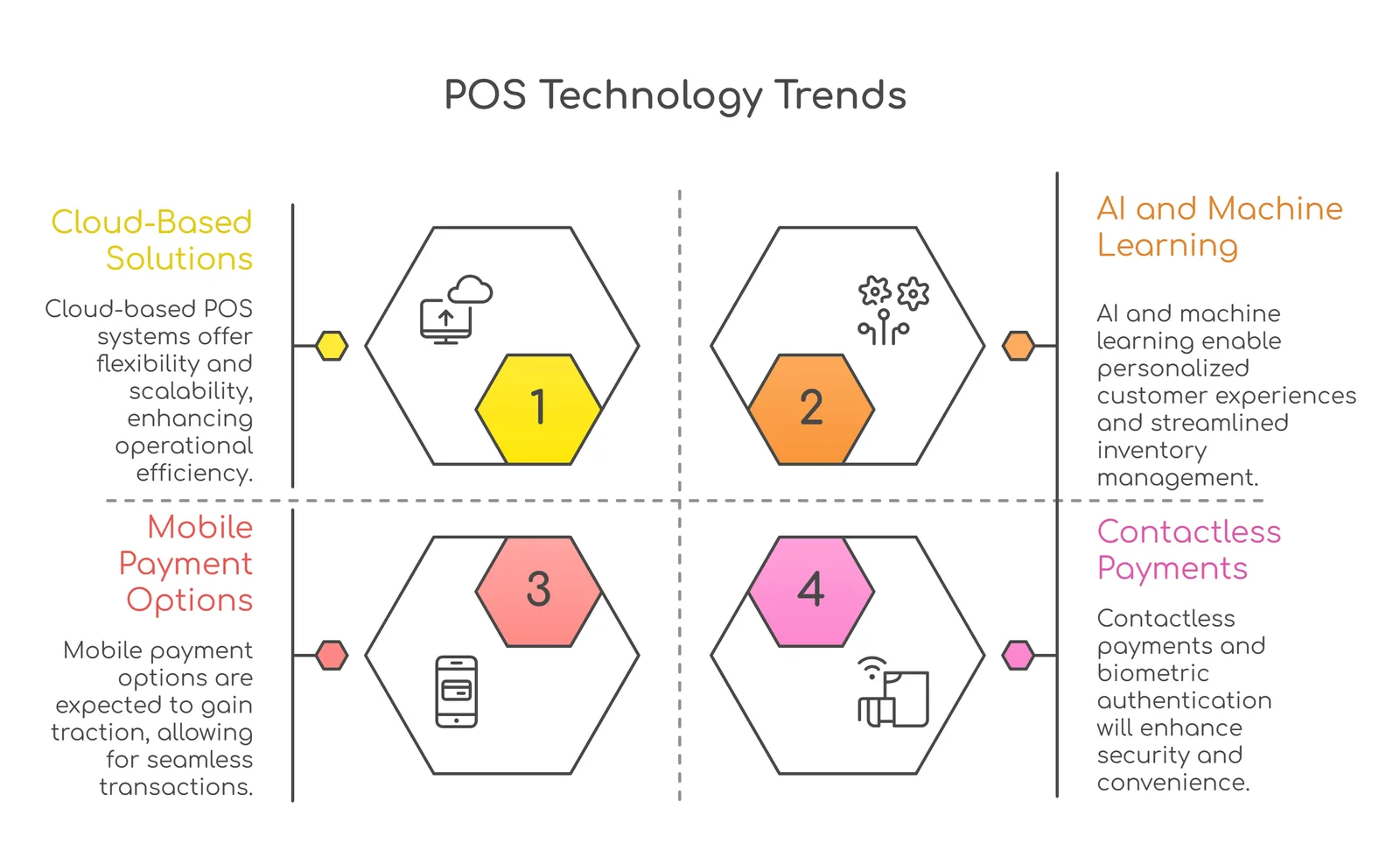
POS systems are no longer just about billing. They are evolving into smart, connected platforms that help businesses manage everything from payments to customer experience in real time. As technology moves forward, POS systems are becoming more flexible, intelligent, and aligned with how modern businesses actually operate.
Here are some key trends shaping the future of POS systems…
1. Shift Towards Cloud and Hybrid POS Systems
Cloud-based POS is quickly becoming the new standard. It allows businesses to access sales, inventory, and performance data from anywhere, in real time.
The market growth reflects this shift, with the global cloud POS market expected to reach around $15 billion by 2030. Alongside this, many businesses are also adopting hybrid models that combine cloud software with local systems. This ensures flexibility while still maintaining reliability in case of internet issues.
2. AI-Powered Insights and Smarter Decisions
POS systems are getting smarter with AI built into their core.
They can now analyze sales patterns, predict demand, and suggest actions automatically. This helps businesses make faster and more informed decisions without relying on manual analysis.
Example:
A store can predict high footfall hours and adjust staffing accordingly, or restock products before they run out based on past trends.
3. Rise of Mobile and Tablet POS
Checkout is no longer limited to a fixed counter.
With mobile and tablet-based POS systems, staff can assist customers anywhere in the store or even outside traditional setups like pop-ups or events. This flexibility makes the buying experience quicker and more convenient.
4. Embedded Payments as the New Normal
Modern POS systems are integrating payments directly into the platform.
This means businesses no longer need separate systems for transactions. Everything from payment processing to reporting happens in one place, making operations simpler and more efficient.
5. Stronger Security with Biometrics and Multi-Layer Protection
Security is becoming more advanced and user-friendly at the same time.
Biometric authentication, like fingerprint or facial recognition, is replacing traditional passwords. Combined with multi-factor authentication, this helps prevent fraud while keeping access quick and seamless for staff.
6. Real-Time Personalization at Checkout
POS systems are now capable of understanding customer behavior in real time.
They can recognize repeat customers, track preferences, and offer personalized deals or recommendations instantly during checkout.
Example:
A returning customer automatically gets a loyalty discount or a suggestion based on their past purchases.
7. More Payment Options, More Convenience
Customers today expect flexibility in how they pay.
POS systems are expanding to support digital wallets, contactless payments, Buy Now Pay Later options, and more. This reduces friction during checkout and improves conversion rates.
8. Automation and Self-Checkout Experiences
Self-checkout systems are becoming more common, especially in retail and quick-service environments.
Customers can scan and pay on their own, reducing wait times and improving efficiency. At the same time, backend automation like real-time inventory updates and automated reports helps businesses run smoothly.
9. Modular POS Systems for Easy Scaling
Businesses no longer want rigid systems.
Modular POS solutions allow companies to start small and add features as they grow, without replacing the entire system.
Example:
A small restaurant can begin with basic billing and later add online ordering, analytics, or CRM as needed.
10. Focus on Sustainability and Eco-Friendly Systems
Sustainability is becoming a key consideration in POS design.
Cloud-based systems reduce the need for heavy infrastructure, while modern hardware is being designed to consume less energy. Features like digital receipts also help reduce paper usage.
11. Omnichannel Integration Becoming Standard
The line between online and offline sales is disappearing.
Future POS systems will fully connect in-store, online, and mobile sales into one unified system, ensuring consistent inventory, pricing, and customer experience across all channels.
12. Voice and Contactless Interactions
With the rise of smart devices, voice-enabled actions and touchless interactions are starting to enter the POS space.
From voice-assisted commands for staff to fully contactless checkout experiences, this trend is focused on speed and convenience.
The future of POS systems is not just about faster billing. It is about creating a connected ecosystem where payments, operations, and customer experience come together seamlessly.
Businesses that adopt these trends early will not just keep up. They will set the pace.
How can Antino help you with advanced POS software development?
Today's POS systems are not just about processing transactions. They are also about developing a perfectly suited system for your company that grows with you and makes daily operations easier without the added complexity.
Antino helps you do that as a reputable POS software development company. Our emphasis is always on developing a POS system that works for you. The process starts with understanding your workflow, and then goes on to develop a solution specifically for you. All elements, such as ease of integration, handling real-time data, and offering intuitively designed user experiences, have been constructed with your company in mind.
If you're looking to get out of your current limits and partner with a trustworthy POS software development organisation to create a future-ready system that offers more control, better insights, and improved customer experience, we can help you succeed more quickly than if you attempted to create your own system. So, contact us right away!